
Tech
How Can Introverts Express Their Ideas Through Ryla AI?


A quote reads “Solitude is the catalyst for innovation”. Yes, many introverts look to spend time alone not only because they love solitude, but also because it helps them engage in innovative thinking. You might be an introvert, but you might have impressed your friends and family with your innovative thinking. Even though you are thoughtful, your shyness prevents you from becoming a social media influencer. Now, you can share your ideas without actually showing your face and voice by creating your AI Avatar with Ryla AI. Here, you can understand how this platform makes this possible.
Ryla AI – An Introduction
As you know, AI is revolutionizing many fields, and it is helping content creators in many ways. Many writers these days’ use AI tools to create content. Similarly, many YouTubers these days’ use AI to generate moral stories, fantasy stories, and many such types of content. Similarly, you can use Ryla AI, which is an AI-driven platform to become a social media influencer. This platform has already started helping many social media influencers generate quality posts. Due to the ultra-realistic videos and photos that this platform generates, many influencers have started using this platform to post videos with their AI avatar that looks and feels like their lovable influencers for followers.
Move from Idea to Content in 5 Simple Steps on Ryla AI
In addition to creating your AI influencer avatar, you can also generate content on this single platform. Here are the steps to follow in this process:
1. Create Your Character
On Ryla AI, you can upload your photo to build your avatar. Otherwise, you can choose your age, face shape, eyes, body type, hair color, and voice to create your avatar. The platform lets you customize each and every detail. Within 5 minutes, the platform will get into shape. Your avatar will be unique, consistent, and ready to create content when you use this platform.
2. Choose Template and Not Prompts to Create Content
You might wonder if you do not know prompt engineering. Even then, Ryla AI can help you. The reason is that, irrespective of whether you intend to create lifestyle, fashion, professional, travel, beauty, or fitness content on social media, you can choose one of the many templates available on Ryla to create your content. After choosing a template, you can click generate on this platform. It will immediately replace the person in the template with your avatar. So, without any guesswork or prompt engineering, you can expect results from Ryla.
3. Generate Content
After you choose a template and click generate, you can see the platform generating content in seconds. You might think that AI avatars are known for plastic-like skin and extra hands. But. Ryla ai specializes in creating perfect hands and crystal-clear skin. Most importantly, the platform has been trained to maintain consistency across the photos and videos you generate on this platform. When your face looks different in posts, people might unfollow you. But this will not happen when you use Ryla for the creation of your social media influencer avatar.
4. Post Everywhere
You might wonder whether this platform will help you create posts only for your Instagram account. However, in reality, this platform can optimize content for different social media platforms like Twitter, YouTube, TikTok, and Instagram. With the right resolution and format, without any guesswork and resizing, the platform lets you create content for different social media platforms.
The final step is to grow and earn, as your content will start generating income for you.


Introduction
Skaipi has become a familiar word in many homes, offices, and classrooms, even if people spell or pronounce it a little differently from place to place. In everyday language, skaipi usually refers to using Skype-style internet calls to talk, see, and share moments with others across any distance. Whether someone says “let’s skaipi tonight” to family abroad or uses it casually with friends, the idea behind it is simple: real-time connection through voice, video, and messages over the internet.
This article explores what skaipi really means, where it comes from, how it shapes modern communication, and how it fits into work, education, relationships, and more. By the end, readers will understand skaipi not just as a piece of tech jargon, but as a living part of digital culture that still influences how people connect today. The focus keyword skaipi will appear naturally throughout, because the concept itself touches so many areas of daily life.
What Is Skaipi in Simple Terms?
In its most practical sense, skaipi describes the act of connecting with someone through internet-based voice and video calls, often inspired by or directly using platforms like Skype. Instead of relying on traditional phone lines, skaipi communication uses data networks, allowing people to talk for a long time, share screens, and send text messages within the same app or platform.
Will You Check This Article: Instablu: Meaning, Uses, and How to Make It Work for You
Over time, the word skaipi has taken on a broader cultural meaning. It can refer to any real-time online conversation that tries to feel as close as possible to “being there” with the other person, whether that happens through a computer, tablet, phone, or even a gaming console. Many people now use it as a verb in casual speech, just like “message” or “call,” because the experience feels familiar, direct, and intuitive.
For people with family and friends abroad, skaipi often represents emotional closeness across distance. Seeing a loved one’s face on screen, joining a birthday virtually, or helping a child with homework from thousands of miles away—these are the everyday stories that give skaipi its human meaning.
Skaipi and the Story Behind Skype
The word skaipi is deeply tied to Skype, a pioneering communication application that popularized easy, low-cost voice and video conversations over the internet. Skype was launched in 2003, created by a team including Niklas Zennström and Janus Friis, along with Estonian developers Ahti Heinla, Priit Kasesalu, and Jaan Tallinn.
The name Skype itself came from combining “sky” and “peer-to-peer,” referring to a network design where users could connect directly with each other across the internet. Early versions of Skype used a hybrid peer-to-peer model, and later moved to a more centralized system built on Microsoft’s infrastructure after the company acquired Skype in 2011.
Even as the underlying technology changed, the core idea that made skaipi so attractive stayed the same: simple, real-time communication that feels natural and personal. Over the years, Skype added features like group video calls, instant messaging, file sharing, screen sharing, and real-time translation, making it a flexible tool for both casual and professional use.
Quick Profile of Skype (Root of Skaipi)
| Feature / Fact | Details |
|---|---|
| Initial launch | First public beta released August 2003 |
| Founders and core team | Niklas Zennström, Janus Friis, Estonian developers Heinla, Kasesalu, Tallinn |
| Original architecture | Hybrid peer-to-peer voice over IP system |
| Acquisition by Microsoft | Purchased for about 8.5 billion USD in 2011 |
| Key communication features | Video calls, voice calls, messaging, file sharing, screen sharing |
This history helps explain why skaipi became shorthand for internet-based conversations. The technology transformed from an experimental idea into a daily habit, creating a cultural footprint that remains visible even as newer platforms appear.
Skaipi as Digital Culture and Everyday Habit
In many communities, skaipi has evolved beyond software and entered everyday language as a symbol of staying in touch. For migrants, international students, and remote workers, skaipi can carry emotional weight because it often becomes the main thread connecting them with home.
Families might set a weekly skaipi evening where everyone gathers on screen, catching up on small details of life that phone calls often miss. In long-distance relationships, partners may use nightly skaipi sessions to share meals virtually, watch a show together, or simply talk about their day. Through these routines, the word skaipi starts to represent comfort, support, and continuity.
Skaipi also shapes how people think about time and distance. Before internet calling, international communication was expensive and limited, but now regular face-to-face conversations are possible at very low cost. This shift influences decisions like studying abroad, accepting remote jobs, or moving to another country, because people know they can maintain close ties through consistent skaipi sessions.
Skaipi in Work and Professional Communication
In the professional world, skaipi-style communication changed how teams collaborate, hold meetings, and make decisions. Video and voice calls over the internet allow colleagues to work together from different cities or countries, reducing travel and making international cooperation more practical.
Remote teams often rely on regular skaipi meetings with video and screen sharing to review documents, present ideas, and resolve issues in real time. Managers can schedule quick check-ins, conduct interviews, and provide feedback without requiring people to be physically present in an office. This flexibility helps companies tap into global talent while employees gain more freedom over where they live.
Professional training and consulting also benefit from skaipi practices. Instructors can host interactive workshops, share slides, and answer questions while seeing participant reactions on screen. Consultants can walk clients through complex processes using live demonstrations, giving them a richer experience than email or voice-only calls could offer.
Skaipi in Education and Learning
Education is another area where skaipi has made a lasting impact. Teachers and students use video conversations to connect across borders, share languages, and explore new topics together. For example, language learners may practice speaking with native speakers through regular online sessions that mimic natural conversation.
Virtual classrooms built on skaipi-style communication enable schools to invite guest speakers from different countries, organize virtual field trips, and bring global perspectives into local lessons. Students who cannot attend in-person classes due to illness, distance, or other reasons can join lectures and discussions remotely, staying engaged without falling behind.
In higher education and professional development, universities and training centers use online seminars, advising sessions, and group projects conducted via skaipi tools. These experiences help learners become comfortable with remote collaboration, a skill that is increasingly important in modern careers.
How Skaipi Works Behind the Scenes
Although most users focus on the human side of skaipi, the underlying technology makes these smooth interactions possible. At its core, skaipi relies on transmitting voice and video data over internet connections using voice over IP (VoIP) technology. This approach turns sound and images into digital packets that travel through networks and are reassembled on the other side in real time.
Earlier versions of Skype used a peer-to-peer model, where users’ computers helped route calls and share network load, reducing the need for central servers. Over time, the system shifted toward centralized data centers and cloud services, improving stability, security controls, and integration with other platforms.
Modern skaipi tools often bundle several capabilities into one interface: calling, messaging, file transfer, screen sharing, and translation. This integration allows a conversation to move quickly from voice to video to document review without switching apps, creating a more natural and efficient flow.
Core Functions of Skaipi-Style Platforms
| Function | Description |
|---|---|
| Voice and video calls | Real-time audio and visual communication over the internet |
| Text messaging | Instant messages within the same conversation thread |
| File and media share | Sending documents, photos, or other files during calls |
| Screen sharing | Showing one device’s screen to others for demos or support |
| Real-time translation | Live translation of speech or text in supported languages |
These technical pieces work together to make skaipi feel simple at the surface. Users usually just see a contact list, a call button, and a chat window, but underneath lies a complex infrastructure that keeps conversations stable and responsive.
Skaipi Across Different Devices and Spaces
One reason skaipi became so widespread is its presence across many devices and environments. People can connect from desktop computers, laptops, tablets, smartphones, and even some gaming consoles or smart TVs. This flexibility means that communication can fit around daily life rather than forcing people to sit at a specific place and time.
At home, someone might use a laptop for a family skaipi session at the dining table so everyone can be in view. During a commute, the same person could switch to a mobile device with headphones, continuing a conversation from a bus or train without interruption.
In offices and coworking spaces, meeting rooms are often equipped with large screens and cameras specifically designed for group skaipi calls. This setup makes it easy for distributed teams to feel as though they are sitting around the same table, even when they are in different cities or countries.
Benefits and Challenges of Skaipi Communication
Like any powerful tool, skaipi brings both clear advantages and real challenges. On the positive side, it dramatically lowers the cost of long-distance communication, especially for video calls that used to be rare and expensive. It also allows people to read facial expressions, body language, and visual context, helping conversations feel more natural and reducing misunderstandings.
However, skaipi depends heavily on stable internet connections and adequate devices. Poor bandwidth can cause delays, frozen screens, and distorted audio, which may frustrate users and weaken the sense of presence. Time zone differences can also make scheduling difficult for global families and teams, sometimes leading to late-night or early-morning calls that affect work–life balance.
Another challenge involves emotional fatigue. Spending many hours on video calls can be tiring because people constantly monitor their own image and surroundings while trying to read others’ expressions. This “video fatigue” encourages some users to switch occasionally to voice-only calls or text, even when skaipi tools offer full video capabilities.
Skaipi, Privacy, and Digital Trust
Trust plays a crucial role in whether people feel comfortable using skaipi for personal and professional conversations. Communication platforms must handle sensitive content, personal details, and sometimes confidential work information. As a result, users increasingly pay attention to privacy policies, data handling practices, and security features such as encryption.
Over the years, providers have introduced various safeguards, from user authentication options to improved spam and abuse protection, to keep skaipi spaces safe. Users can also take practical steps, such as using strong passwords, being careful about unknown contacts, and avoiding sharing private information in public or untrusted calls.
Despite these measures, no system is completely risk-free, so digital literacy becomes part of responsible skaipi use. Understanding basic security practices and being selective about which platforms to trust can help protect both personal and professional relationships built through online communication.
The Evolving Future of Skaipi
Even as new communication tools emerge, the core idea behind skaipi continues to evolve rather than disappear. Advances in audio and video quality, noise reduction, and background effects aim to make conversations more comfortable and less distracting. Integration with other software—such as calendars, collaboration tools, and translation services—keeps expanding what can be done within a single call.
In the future, more immersive technologies may bring elements of virtual or augmented reality into skaipi experiences, allowing people to feel present in shared digital rooms or simulated environments. These possibilities build on the same purpose that gave skaipi meaning from the beginning: using technology to make human connection easier, richer, and more immediate.
People also like this: RepMold Explained: Modern Replication Molding Made Simple
For users, this means that learning to communicate comfortably and thoughtfully through skaipi will remain a useful skill. As platforms change, the underlying habits—clear speaking, respectful turn-taking, and mindful listening—will still define how meaningful each conversation becomes.
Conclusion
Skaipi represents much more than a piece of software; it reflects a new way of relating to distance, time, and relationships in a connected world. From families preserving emotional closeness across continents to teams collaborating on global projects, skaipi-style communication has reshaped everyday routines and expectations.
Understanding skaipi means looking at both its human and technical sides—the stories of migrants, students, and professionals who rely on it, and the digital infrastructure that quietly powers their calls. Appreciating its benefits alongside its challenges helps people make better choices about when and how to use it, whether they need deep focus for work, emotional support from loved ones, or educational opportunities they cannot reach in person.
Going forward, the core promise of skaipi remains constant: using simple tools to create moments of genuine presence, even when miles apart. By approaching each conversation with intention and care, users can turn every skaipi session into a meaningful bridge between their physical and digital lives.
Frequently Asked Questions (FAQs)
What does skaipi mean in everyday language?
In everyday language, skaipi usually refers to making voice or video calls over the internet using platforms similar to Skype, often used casually as a verb for online calling. It emphasizes real-time, face-to-face style communication rather than traditional phone calls.
Is skaipi the same as Skype?
Skaipi is closely associated with Skype, but the word can be used more broadly to describe any Skype-like internet call experience. People sometimes say “skaipi” even when using other apps, because the concept feels similar.
How is skaipi used in family and personal life?
Families and friends use skaipi to stay emotionally connected through regular video chats, virtual celebrations, and everyday conversations. It helps reduce the emotional distance created by travel, migration, or busy schedules.
Why is skaipi important for remote work and learning?
Skaipi allows remote teams to collaborate in real time, share screens, and hold face-to-face discussions, supporting flexible work arrangements. In education, it enables virtual classes, language exchanges, and access to experts from anywhere in the world.
Are there any downsides to relying on skaipi?
Yes, skaipi depends on good internet connectivity and can cause fatigue when used for many hours of video calling. Users also need to stay aware of privacy and security practices to protect their personal and professional conversations.

Introduction
Instablu is a curious, shape-shifting term that keeps popping up in conversations, app searches, and social media captions, yet it rarely means the same thing to everyone who uses it. For some, Instablu is a mysterious companion app promising a blue-tinted interface and slick Instagram-style tools, while for others it’s simply a cool visual trend or shorthand for that whole “blue check” culture. If you’ve ever wondered whether Instablu is a real platform, just a design aesthetic, or something more, this guide breaks it all down in simple, practical language. By the end, you’ll understand what Instablu stands for in different contexts, how people use it, and how to tap into the idea safely and creatively in your own digital life.
What Is Instablu?
Instablu isn’t a single, official product with a neat, universal definition; instead, it’s an umbrella term that tends to surface in three main ways across the internet. Some posts describe it as a lightweight social or companion app, others treat it as a visual “blue look,” and some people casually use it when talking about verification and blue badges on social platforms. This fluid meaning can be confusing, especially if you’re trying to decide whether to install something called Instablu or just follow a visual style inspired by it.
Will You Check This Article: RepMold Explained: Modern Replication Molding Made Simple
At its core, Instablu usually points toward a blend of modern, cool-toned aesthetics and the culture around social recognition, such as blue checkmarks and status indicators. That’s why it often appears in comment threads about experimental tools, trending filters, and discussions about credibility online. Understanding these layers helps you avoid risky tools while still borrowing the parts of Instablu that actually add value to your content or personal brand.
Quick Snapshot: Instablu at a Glance
| Aspect | What “Instablu” Often Refers To |
|---|---|
| Type | Nickname for apps, trends, or verification talk. |
| Common Uses | Companion apps, blue-toned visuals, blue-check discussions. |
| Official Status | No official, unified platform; mostly informal usage. |
| Risk Level | Varies by app or service; requires careful verification. |
Instablu as an App or Product
One of the most common uses of the word Instablu is as a name for niche or experimental apps that connect in some way to visual sharing platforms. These references often describe Instablu as a small companion tool with a blue-themed interface that promises quick reposting, simple analytics, or streamlined content workflows. Many of these tools are mentioned in relation to closed betas, invite-only communities, or region-limited releases, which naturally makes them feel exclusive and a little mysterious.
However, this “Instablu app” side also comes with uncertainty because there is no universally recognized official Instablu platform with a stable brand or public company behind it. That means different products can adopt the same name, sometimes temporarily, and users may encounter varying levels of quality, transparency, and support. In practice, the Instablu label becomes more of a vibe or promise than a guarantee of specific features.
From a safety perspective, any Instablu-branded app should be treated like any other small third‑party tool: with curiosity but also with caution. Before granting access to your accounts or data, it’s wise to check reviews, confirm who runs the app, and be very wary of anything asking for sensitive credentials or payment in exchange for guaranteed outcomes.
Instablu as a Visual Aesthetic
Another big slice of Instablu’s identity is a visual style built around cool, blue-driven atmospheres in photos, layouts, and interfaces. When creators mention Instablu aesthetics, they often mean feeds, mood boards, or brand kits that lean into navy, cobalt, slate, ice blue, and teal, often paired with cool grays and off‑white accents. The result is a look that feels sleek, calm, and slightly futuristic, ideal for travel shots, city skylines at night, tech-focused imagery, and minimal brand presentations.
In this sense, Instablu acts like a shorthand for a cohesive color story rather than a specific tool you must download. Anyone can create an Instablu-style presence simply by choosing consistent blue tones, favoring clean layouts, and keeping visual clutter low so the cool colors can stand out. Because it doesn’t depend on any one app, this interpretation of Instablu is also the safest and most flexible way for creators, freelancers, and businesses to “use” Instablu today.
A helpful way to think about it is that Instablu is the feeling of coastal evenings, glassy reflections, and illuminated cityscapes translated into digital design. Whether you’re styling personal photos, building a profile, or designing simple graphics, this aesthetic gives your content a unified mood without requiring any technical background.
Instablu and the Blue Check Culture
The third major context where Instablu shows up is in conversations about blue checkmarks, verification badges, and status on social platforms. In these discussions, people sometimes use Instablu as casual slang for everything surrounding verification: who has the blue check, what it means, and how people try to obtain it using tools or services. Because badges are tightly tied to authenticity and credibility, this Instablu usage often overlaps with talk of monetization, influence, and audience trust.
In that environment, Instablu isn’t a software product at all; it’s more of a symbol for the pursuit of public recognition and the tools that claim to make that journey easier. This is also where risk increases, since there’s a long history of unofficial services promising verification in exchange for payment, credentials, or other sensitive data. Any Instablu-branded offer that suggests guaranteed access to blue badges or privileged status deserves extra scrutiny.
Rather than viewing Instablu as a shortcut to fame, it’s healthier to see it as a reminder that lasting recognition still rests on authenticity, consistent presence, and clear value for your audience. Verification rules change, but those fundamentals tend to stay the same, regardless of what new buzzword or tool comes along.
Is Instablu a Real, Official Platform?
Because Instablu appears in so many different ways, the natural question is whether there’s a single, official Instablu platform to sign up for. Current information indicates that there is no universally recognized, fully established platform with that name that dominates the space in the way major social networks do. Instead, Instablu remains a loose term, attached to small tools, visual trends, and conversations about blue badges rather than to a singular corporate entity.
That doesn’t mean every Instablu-labeled app or project is illegitimate, but it does mean you shouldn’t assume a unified ecosystem or long-term stability. Many references to Instablu mention region-limited access, invite-only betas, or experimental builds, which are all common traits of small, niche software. These projects can be useful in specific cases, yet they may also disappear, rebrand, or change direction without much public announcement.
In practical terms, the safest mindset is to treat Instablu as a descriptor rather than as a guaranteed, permanent platform. When you come across the term, it helps to ask: is this about an app, an aesthetic, or verification talk? Answering that question first makes it easier to decide how to respond, whether that’s testing a new tool, applying a visual style, or simply following a conversation about blue badges.
How Users Interpret Instablu in Everyday Life
People don’t use Instablu in a rigid or uniform way; instead, they attach their own needs and expectations to it. Casual users might talk about “going Instablu” when refreshing the look of their feed with cooler tones and tidier compositions, focusing on mood rather than technology. Creators and brands, meanwhile, may reference Instablu when exploring new third‑party tools, beta apps, or visual kits that fit the blue-centered design language.
Some communities frame Instablu as a kind of shorthand for conversations around legitimacy—who looks authentic, who appears professional, and how blue badges signal that to the public. In those contexts, the term becomes more about status than features, linking the idea of “blue” with trust and recognition. That emotional weight can be powerful, especially for those building a public presence or trying to stand out in crowded spaces.
The flexibility of Instablu is exactly what keeps it alive across threads and platforms. Because it doesn’t belong to just one company or product, people can adapt it to describe different combinations of style, tools, and aspirations—sometimes all at once. For anyone looking to use the concept, that adaptability is an opportunity, but it also calls for clear boundaries about which parts you’re embracing and which you’re consciously avoiding.
Practical Ways to Use Instablu Safely and Creatively
Even though Instablu is fluid, there are practical ways to bring its strongest elements into your digital routine without exposing yourself to unnecessary risk. A smart starting point is to focus on the aesthetic side, where the emphasis is on color, composition, and mood rather than on handing over access to your accounts. You can adopt cool blue palettes, simplify layouts, and keep visual noise low to give your content a unified, Instablu-inspired identity.
If you experiment with apps or tools that carry the Instablu name, it’s wise to follow a few simple checks: verify the developer’s background, read available reviews, and confirm that no one is promising guaranteed status, badges, or special privileges in exchange for sensitive information. Treat any such promises as warning signs, regardless of how polished the interface or branding appears. In many cases, you can get the same visual results using trusted editing apps while keeping control over your credentials.
It can also be helpful to think of Instablu as a creative prompt rather than a single tool. Ask how a cool-blue, minimal, city‑by‑night aesthetic could support your personal projects, whether that’s photography, digital art, or simple profile refreshes. Approached that way, Instablu becomes a source of inspiration instead of a mysterious promise.
Key Instablu Usage Dimensions
| Dimension | Instablu in Practice |
|---|---|
| Visual Style | Cool, blue-heavy palettes, minimal layouts, calm yet modern mood. |
| Tools & Apps | Small or experimental companion apps with blue-themed UIs and utility promises. |
| Social Meaning | Shorthand for blue-check talk, perceived status, and authenticity online. |
| Safety Considerations | Need for careful vetting of any third-party app or service using the name. |
Instablu Across Different Intent Types
Instablu can show up in conversations with very different purposes, which is why understanding user intent matters if you’re trying to respond or create around it. Some people use the term informationally, asking what Instablu is, how it works, or whether it’s safe to use. Others treat it in a more transactional or exploratory way, seeking tools that can refresh their visuals, streamline posting, or support their presence on visual platforms.
There’s also a navigational angle, where users search for “Instablu” expecting to land on a specific site or app page, even though the term doesn’t yet anchor a single, globally dominant destination. This mismatch between expectation and reality can lead to confusion if people assume that the first result carrying the name is the “official” one. Being aware of that gap makes it easier to approach results with a calm, critical mindset instead of clicking the first thing you see.
From a broader perspective, Instablu functions as a flexible label that can move with trends and tools. As new visual fashions emerge or platforms adjust how blue badges work, the term can shift toward whatever combination of color, status, and creativity captures people’s attention at the moment. Anyone engaging with it benefits from revisiting its meaning from time to time rather than assuming it stays fixed.
Case-Style Scenarios Illustrating Instablu
To make Instablu more concrete, it helps to imagine a few realistic scenarios that mirror how people already use the term. In the first scenario, a creator wants a calmer, more cohesive feed and adopts an Instablu-inspired palette: deep navy for backgrounds, teal accents, and icy highlights for text overlays. Without ever installing a new app, that creator can truthfully say they’ve “gone Instablu” because they’ve embraced the aesthetic and mood associated with the term.
In another scenario, a small team discovers a niche companion app calling itself Instablu that simplifies reposting and displays content metrics in a blue-themed dashboard. They test it on secondary accounts, verify that no sensitive data is being misused, and use it as a lightweight tool in their workflow. Here, Instablu is a practical, functional product, even though its reach is limited and its long‑term future is uncertain.
People also like this: Pravi Celer Explained: Origins, Benefits, and Real Uses
A third scenario involves a group chat where friends joke about “chasing Instablu” as they discuss blue badges and verification policies. No one is referencing an app or a design trend; instead, they’re using Instablu as a playful stand‑in for the whole world of blue-check culture. These examples highlight how flexible the word is and why context is everything when trying to understand what someone means.
Conclusion
Instablu is best understood as a fluid idea rather than a fixed, monolithic product. Depending on context, it can point to small companion apps with blue interfaces, a cool-toned visual aesthetic, or the culture and conversations around blue badges and perceived status online. This flexibility explains why Instablu appears in so many feeds and threads without ever solidifying into one globally recognized platform.
For everyday users and creators, the most dependable way to benefit from Instablu is to lean into its aesthetic and symbolic strengths while staying cautious about any tool that asks for more access than it reasonably needs. Cool blue palettes, minimal layouts, and thoughtful use of visual mood are safe, repeatable ways to capture the Instablu feeling. At the same time, maintaining a skeptical eye toward promises about status or guaranteed outcomes helps keep your accounts and reputation protected.
Handled thoughtfully, Instablu can become a helpful concept in your creative toolkit—a way to name and organize a style, a set of aspirations, or a particular mood—without locking you into any single app or service. Treat it as inspiration, not obligation, and you’ll be able to adapt the Instablu idea to whatever projects or platforms matter most to you.
Frequently Asked Questions (FAQs)
1. What does Instablu actually mean?
Instablu is an informal term that can refer to small companion apps, a cool blue visual style, or casual talk about blue badges and verification on social platforms. Its meaning changes depending on how and where people use it in conversation or content.
2. Is Instablu an official app or social network?
There is no single, widely recognized social network or major platform officially branded as Instablu. Instead, the name shows up on niche tools, design trends, and discussions about visibility and status online.
3. Is it safe to use Instablu apps?
Safety varies by app, since different developers may use the Instablu name for different tools. It’s important to review permissions, research the developer, and avoid any service that promises guaranteed badges or requests sensitive account credentials.
4. How can I create an Instablu-style look?
You can build an Instablu-style look by using navy, cobalt, slate, ice blue, and teal alongside cool grays and off‑whites in your photos or graphics. Keeping layouts minimal and clean helps reinforce the calm, modern mood associated with this aesthetic.
5. Does Instablu help with getting verified?
No third‑party tool can guarantee verification, even if it uses the Instablu name or branding. Verification decisions are controlled by each platform’s own policies, so any promise of guaranteed badges in exchange for money or login details should be treated as a major red flag.
Introduction
Repmold is a term that’s quietly gaining attention across manufacturing, product design, and materials engineering—and for good reason. At its core, repmold refers to a replication molding approach that allows makers to reproduce complex shapes, textures, or components with impressive accuracy and consistency. Whether you’re prototyping a new idea, restoring a legacy part, or scaling production efficiently, repmold offers a practical bridge between creativity and repeatability. In this guide, you’ll learn what repmold really means, how it works, where it’s used, and why it matters in today’s fast-moving production landscape.
Will You Check This Article: Pravi Celer Explained: Origins, Benefits, and Real Uses
Before diving deep, it helps to set expectations. This article breaks down repmold from first principles, explores real-world applications across industries, compares it to alternative methods, and shares practical insights you can apply right away. By the end, you’ll have a clear, confident understanding of repmold and its role in modern fabrication.
Repmold at a Glance
| Aspect | Details |
|---|---|
| Core idea | Replication molding of parts or surfaces |
| Typical materials | Silicone, polyurethane, epoxy, composites |
| Key benefit | Accurate reproduction with low tooling cost |
| Common uses | Prototyping, restoration, small-batch production |
| Skill level | Beginner-friendly to advanced, depending on setup |
What Is Repmold?
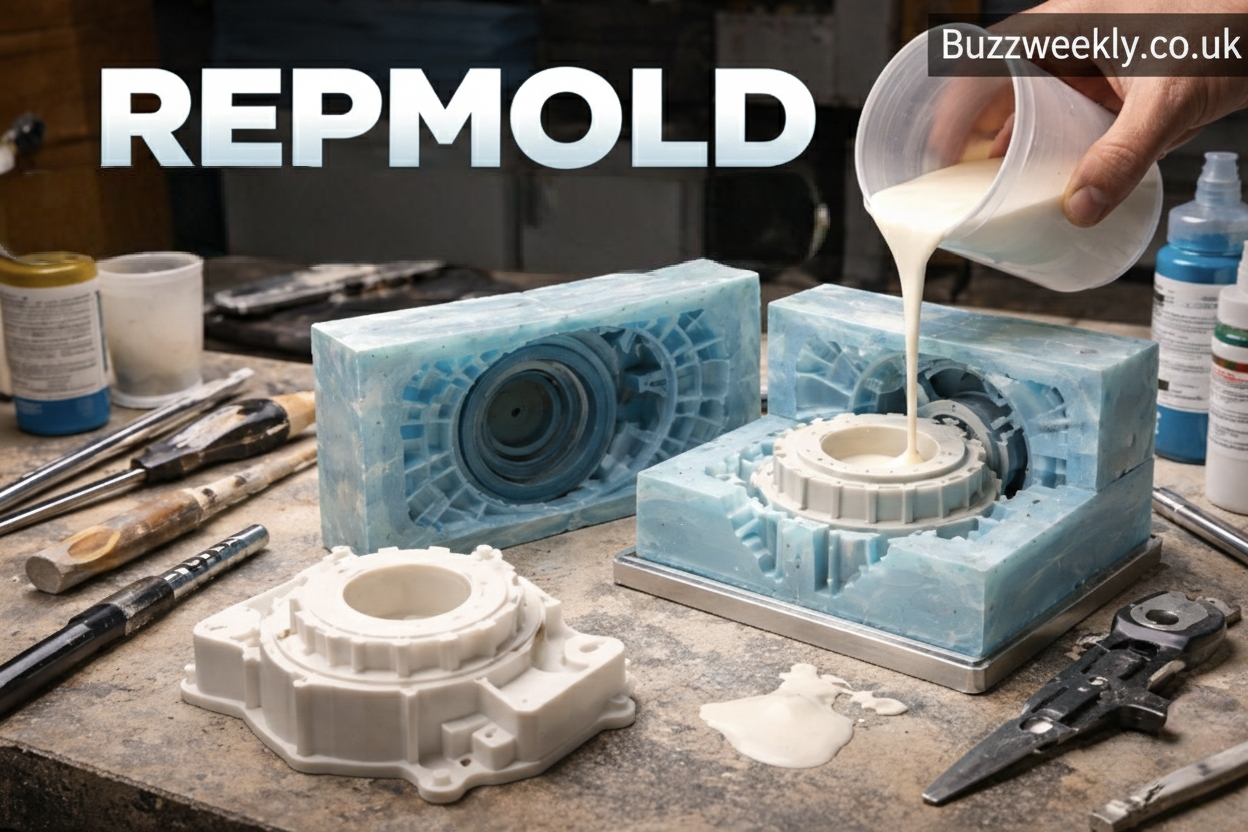
Repmold is best described as a replication molding technique that creates duplicates of an original object by forming a mold around it and casting replicas from that mold. The original can be a handcrafted model, a legacy part, or a digitally produced master. Once the mold exists, multiple copies can be produced with consistent dimensions and surface detail.
What makes repmold stand out is its flexibility. Unlike heavy industrial tooling that demands high upfront investment, repmold methods can be adapted for small workshops, labs, or even on-site repairs. This adaptability has helped repmold spread across disciplines that value precision without excessive cost.
Another defining feature of repmold is material freedom. Depending on the application, molds and castings can be made from elastomers, resins, or reinforced composites. This allows creators to balance durability, flexibility, and finish quality based on real needs rather than rigid constraints.
How Repmold Works Step by Step
Understanding the repmold process is easier when you visualize it as a careful sequence rather than a single action. Each stage builds on the last, and small choices can influence the final outcome significantly.
The process usually begins with a master pattern. This master represents the exact shape and texture you want to reproduce. It’s cleaned, sealed if necessary, and positioned to allow proper mold flow. The mold material is then mixed and poured or applied around the master, capturing every detail as it cures.
Once cured, the mold is opened and the master removed. The resulting cavity becomes the template for replication. Casting material is introduced into the mold, allowed to set, and then demolded as a finished replica. With proper care, one repmold can produce dozens or even hundreds of consistent parts.
Materials Commonly Used in Repmold
Material selection plays a central role in repmold success. Different materials behave differently during curing, demolding, and long-term use. Choosing wisely saves time and avoids costly rework.
Silicone rubbers are popular for molds because they’re flexible, durable, and excellent at capturing fine detail. For castings, polyurethane resins are common thanks to their strength and versatility. Epoxies come into play when higher thermal or chemical resistance is needed.
The beauty of repmold lies in mixing and matching. A soft mold paired with a rigid casting, for example, makes demolding complex shapes much easier. This balance is one reason repmold has become a favorite among designers who value both precision and practicality.
Key Advantages of Using Repmold
One of the biggest advantages of repmold is cost efficiency. Traditional tooling can be expensive and time-consuming, especially for short production runs. Repmold lowers the barrier, allowing experimentation without financial strain.
Another benefit is speed. Once the master is ready, molds can often be produced in hours rather than weeks. This rapid turnaround is invaluable during development cycles where ideas evolve quickly.
Repmold also supports remarkable detail fidelity. Textures, undercuts, and subtle features transfer cleanly from master to replica. This makes it ideal for aesthetic components where appearance matters as much as function.
Repmold vs Traditional Manufacturing Methods
Comparing repmold to conventional methods highlights why it’s so widely adopted. Injection molding, for example, excels at massive volumes but requires costly steel tools. Machining delivers precision but can struggle with complex internal geometries.
Repmold occupies a middle ground. It doesn’t replace large-scale manufacturing, but it complements it beautifully. For small batches, custom parts, or transitional production phases, repmold often delivers the best balance of speed, cost, and quality.
Think of repmold as a flexible toolkit rather than a single machine. It adapts to the problem at hand instead of forcing the problem to fit the process.
Industries That Rely on Repmold
Repmold has found a home in a surprisingly wide range of industries. In product design, it enables rapid prototyping and user testing without long waits. In automotive restoration, repmold helps recreate discontinued trim pieces or interior components.
Medical and educational fields use repmold to create anatomical models and training aids. Art and cultural preservation teams rely on it to replicate artifacts while protecting originals. Even construction and architecture benefit through decorative elements and custom fixtures.
This cross-industry relevance shows that repmold isn’t confined to one niche. Its value lies in adaptability, making it useful wherever accurate reproduction is required.
Real-World Example: Restoring a Legacy Component
Consider a small manufacturer tasked with maintaining an aging machine whose replacement parts are no longer available. Traditional machining would be slow and costly, especially for a complex shape. By using repmold, the team creates a mold from the remaining original part and casts durable replacements.
The result is minimal downtime, consistent quality, and a fraction of the expected cost. This kind of practical success story explains why repmold often becomes a go-to solution once teams experience its benefits firsthand.
Design Considerations for Successful Repmold Projects
While repmold is forgiving, thoughtful design improves outcomes. Draft angles, for instance, help parts release smoothly from molds. Avoiding extreme undercuts can extend mold life and reduce defects.
Surface preparation matters too. A well-finished master yields cleaner replicas. Simple steps like sealing porous materials or smoothing rough edges can dramatically improve final results.
Planning ahead also includes considering production volume. A mold intended for ten parts can differ from one designed for a hundred. Aligning expectations early keeps the project efficient and predictable.
Common Challenges and How to Overcome Them
Every process has challenges, and repmold is no exception. Air bubbles are a frequent concern, especially in detailed areas. Careful mixing, controlled pouring, and proper venting help mitigate this issue.
Mold degradation can occur if materials are mismatched or stressed beyond their limits. Selecting compatible materials and following recommended cure times preserves mold integrity.
Finally, dimensional accuracy depends on understanding material shrinkage. Accounting for this during master creation ensures replicas meet specifications without surprises.
Sustainability and Repmold
Sustainability is increasingly important, and repmold offers some subtle advantages. By enabling localized production and reducing wasteful overproduction, it supports more responsible manufacturing habits.
Many modern molding and casting materials are designed for lower environmental impact, with longer mold life and reduced emissions during curing. Repmold also encourages repair and restoration, extending the life of existing products instead of replacing them outright.
These factors position repmold as a thoughtful choice in a world that values efficiency alongside environmental awareness.
The Future of Repmold
Looking ahead, repmold continues to evolve alongside digital tools and advanced materials. Improved elastomers, faster-curing resins, and hybrid workflows are expanding what’s possible.
People also like this: Ksözcü: Meaning, Context, and Why This Term Matters Today
As customization becomes more valued than mass uniformity, repmold’s role is likely to grow. Its ability to deliver tailored solutions quickly aligns perfectly with modern expectations of flexibility and responsiveness.
Conclusion
Repmold represents a smart, adaptable approach to replication molding that bridges the gap between creativity and production. By understanding how repmold works, choosing the right materials, and applying thoughtful design principles, creators can achieve reliable, high-quality results across countless applications. From restoration to prototyping and beyond, repmold proves that effective solutions don’t always require massive infrastructure—just the right process applied with care. Embracing repmold means embracing efficiency, precision, and practical innovation.
Frequently Asked Questions (FAQs)
What does repmold mean in simple terms?
Repmold refers to a replication molding process used to create accurate copies of an original part or object using a reusable mold.
Is repmold suitable for beginners?
Yes, many repmold techniques are beginner-friendly, especially small-scale projects using silicone molds and simple casting materials.
How durable are repmolded parts?
Durability depends on the casting material chosen. With the right material, repmolded parts can be strong and long-lasting.
Can repmold be used for custom designs?
Absolutely. Repmold is ideal for custom or limited-run designs where flexibility and detail matter more than mass volume.
How long does a typical repmold last?
A well-made repmold can produce dozens to hundreds of parts, depending on material choice and handling.

The GTA 6 Hype Cycle: What the Numbers Say

How Strategic Investing Supports Long-Term Financial Success

8 Best Touchscreen Recognition Systems for Prep Schools and Private Academies

Mickey Rourke Young: From Beautiful Rebel To Cult Icon

Mark McCann Net Worth 2025: Supercars And Millions
